My Stylus Is Working

Following up on my last post, I managed to get a stylus fully working with the Motion Computing tablet. I received the new stylus that I ordered from Motion and gave it a try, but it acted the same as my current stylus. So I had to do some more digging and I found out that I was using the wrong device driver.

The driver on Motion’s website does not add pressure sensitivity. I originally found some old forum posts saying that legacy Wacom drivers will work, but I was never able to get any of them to install. So I went to the official Wacom driver website and downloaded the drivers from the “Legacy Drivers” section, All of my attempts failed with “no compatible hardware found” errors.

Then I noticed a different link on the main Wacom driver page: “Wacom Feel IT”, also subtitled “Visit our Table PC driver page”. It turns out that the driver on that page successfully installed and added advanced features, especially pressure sensitivity.

I have played with it a bit since getting it working, but not extensively. However, I have found that when I use the eraser side of the stylus, I still try to brush away the eraser dust as if it was a real pencil. It will take a while to erase that habit, I guess.

Motion Computing LE1700

The Motion Computing LE1700, a tablet computer from 2007.

At the beginning of the year, I was in the habit of drawing and sketching on a regular basis. But in the last few months, I haven’t drawn anything. After reading Pi Visuals’ post about getting a stylus for his iPad for drawing and animation, I started thinking about getting that stylus, too.

But then I remembered that I already have a tablet computer with a stylus, the Motion Computing LE1700. My wife originally used it at work, but she preferred a laptop so eventually this came home and ended up in my closet.

So this week, I looked into the details of the the LE1700 and found out that the stylus technology is from Wacom, maker of probably the best stylus and tablet hardware. The LE1700 includes pressure sensitive input, which is an amazing feature to use for drawing. This particular model does not have touch input, but for my purposes that is actually better: I can rest my hand on the screen and it will not affect the drawing. And it runs a full version of Windows (Vista, unfortunately), so I can install full applications like Photoshop or GIMP.

The downside to the machine is that it has a very short battery life, is very heavy compared to an iPad, and it tends to get pretty warm. But, considering that I already own it, I cannot complain too much.

Unfortunately, the pressure sensitivity on my machine is not working. I have spent a lot of time this week trying to figure out the problem, hoping that it was just a software or driver issue. The device was also exhibiting some strange behavior in Internet Explorer (probably caused by its tour of duty at my wife’s work), so I ended up doing a full restore from the initial factory image. Actually, due to some bizarre patch problem that completely broke Windows, I had to rebuild it twice, which cost me about a day. And after all that, the pressure sensitivity is still not working.

I read online that the stylus itself can lose pressure sensitivity. So, I am buying a replacement stylus from Motion Computing and hoping that fixes the problem. It would be great to have a full Wacom slate computer with pressure sensitive stylus for drawing. But, if the pressure sensitivity is still broken with the new stylus, at least I can use it in the same manner as an iPad, but with a more full-featured OS and applications.


RenderMan Free For Non-Commercial Use

Pixar Animation Studios announced that the next version of RenderMan, their award winning render engine, will be free for non-commercial use. The non-commercial license will provide full functionality without any restrictions, watermarks, or time limits. And the next version is due out sometime soon (fourth quarter of this year, according to their website).

The render engine works with Maya, but currently does not work with LightWave. Some third-party developers are creating plugins for LightWave that will add RenderMan integration. I expect that once the RenderMan non-commercial licenses are available, there will be more developers working to make this happen (the non-commercial license allows for developing commercial tools and plugins).

In their FAQ page for the non-commercial licenses, they explain why they have chosen to give away these licenses. One of the reasons is exciting to see from such a leading studio:

“It is Pixar’s experience that limitations on software access have become an impediment to the development of the production industry, and that universal access and a set of common standards and practices can only stimulate further growth.”

Hopefully this type of open access for educational and personal use becomes more common, which I believe is good both for aspiring artists and the companies selling high-end software packages.

I am going to sign up for advance registration of the license, even if it might be a while before I get a chance to use it.

Postscript:  Here is a good good article on the new features and architecture of RenderMan (including the new RIS framework).

Improve Your Grammar with Weird Al

To promote his brand new record, Weird Al has created eight music videos and is releasing a new one each day. You can view the new videos as they are released at his website, WeirdAl.com (four have been released so far).

In Tuesday’s video he parodies “Blurred Lines”, a song I find extremely annoying and repetitive but with a music video I cannot help but enjoy (warning: NSFW). Weird Al’s version, “Word Crimes”, is a huge upgrade to the original song. Pay attention to the video and you might learn a little about good grammar!

Another great video is “Foil”, a parody of Lorde’s “Royal”. This one was created with CollegeHumor.com and features Patton Oswalt!

“Tacky”, his first video of the week, was produced by Nerdist and is one long continuous camera shot. Unfortunately, it is another piece of otherwise solid comedy that was fatally tainted by the addition of Kristen Schaal.  You have been warned.

Free LightWave Models

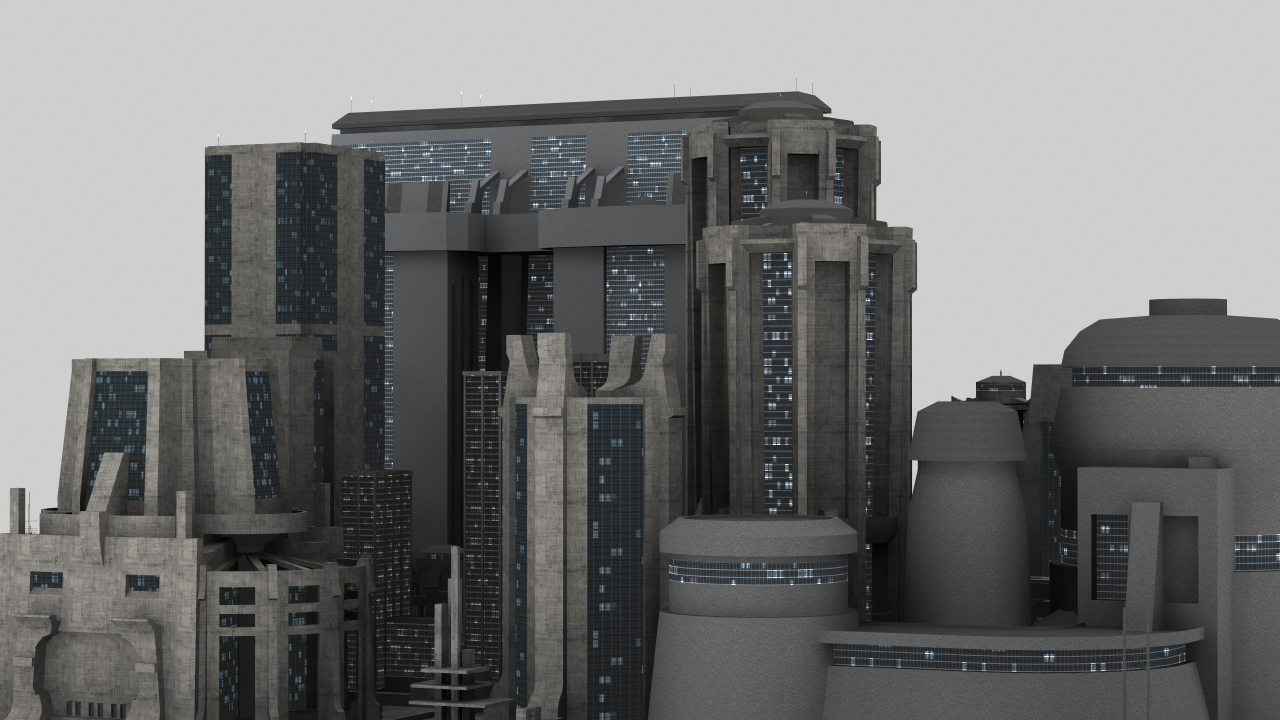
I stumbled onto a new 3D animation product website that also has a marketplace for 3D models.  The product is DAZ 3D and their site is daz3d.com. It looks like the software uses preexisting models and provides an interface for animating those models. But I was more interested in the model marketplace, which are provided without any restrictions for use.

There are a few models that are priced at $0.00. That’s free! Unfortunately, the site’s search features make it very difficult to find the full list of free models. However, I did find two model sets that are pretty cool, both of which are for cityscape buildings. The models are in LWO format (the native LightWave object format) and include textures.

Dystopia City Blocks Test Render
(click for full image)

Another good 3D model marketplace is TurboSquid, which has much better search features than DAZ 3D. TurboSquid also has a semi-secret way of filtering for only the free models: filter by price and set the min and max values to “0”. The only downside to TurboSquid is that a lot of the models are only available in 3DS Max format, which is proprietary and cannot be opened by LightWave or Blender.

Cowboy Bebop Returns to Adult Swim

Back in October, Adult Swim/Toonami lost the rights to air Cowboy Bebop (my favorite anime). Fortunately, that little problem was only temporary. Toonami announced that Cowboy Bebop will return in July, although they have not said the exact date (DirecTV does not list it next weekend).

Unfortunately, they are still expected to air the old standard definition version of the series (the HD version was released in Japan on Blu-ray last year).  That means they will probably continue to air the show without the regular end credits, which is a shame because the song, The Real Folk Blues, is a fantastic one. And the scenes shown behind the credits add important details about Spike’s past. Maybe one day Toonami will air the HD version and include the end credits again.

Calvin and Hobbes Fan Trailer

I found this cool fan-created movie trailer for a (fake) Calvin and Hobbes movie. I loved Calvin and Hobbes as a kid (still do) and the trailer does a great job of including a lot of small details from the strip, like killer snowmen and attacking food.  The creators also posted some behind-the-scenes videos, so you can get an idea of some of the work that went into the final product.  Enjoy!

Las Vegas Aerial Photos

I went to Las Vegas a few weeks ago for a short vacation and  flew in a helicopter for the first time. I took along my DSLR camera, which I bought a few years ago and rarely use (unfortunately), so I was able to get some pretty nice shots while up in the air. I have a Nikon D90 with a kit lens (AFS Nikkor 18-105mm, 3.5-5.6 aperture). I forced myself to use manual mode during the entire trip to get more familiar with the camera and photography, and I think it payed off with the aerial night shots.

Here are a few of the pictures I took:

Continue reading “Las Vegas Aerial Photos”

Syfy Adapting Frank Miller’s Ronin

Syfy is adapting Frank Miller’s Ronin comic book story as a series.

I have not read Ronin, but the story sounds pretty interesting. It is about a 13th-century masterless samurai with a magical sword that is suddenly thrown into a dystopian 21st-century future, where he tries to track down and slay the demon that killed his master.

Sound familiar? It should, because it was a big part of the inspiration for Samurai Jack. The show is scheduled to air next year, so I hope I remember to check it out.

CrashPlan Cloud Backups

I just bought a one-year subscription to CrashPlan, a cloud backup service. I am in the process of backing up 145 GB of data to their servers, which the desktop client estimates will take about 2 weeks at my current speeds.

I have used Mozy for years, ever since my brother had a massive hard drive crash and I realized that I didn’t have a good backup plan for my own data. At the time, the only real options for online backup were Mozy and Carbonite, and Mozy was a much better product. Unfortunately, over the years they have changed their plans to make it more expensive without any obvious improvements to the service to justify the price increase. When I first started using Mozy, you could back up an unlimited amount of data to their servers. Now, I have to pay extra for the 125 GB of storage they are willing to give me.

I have been hovering just below the limit for a while, purposely excluding some data so I don’t go over and have to pay even more per month. So I finally decided to look around for an alternative and found two solid options: CrashPlan and BackBlaze.  Both have excellent reviews online and it seems like you could flip a coin between them and end up with a great backup service. Both have unlimited data backups, encrypted transport, encrypted storage, and a bunch of other nice features.  And both are around $5 per month, depending on your payment plan.

My main reason for choosing CrashPlan was because it stores unlimited versions of  your files (BackBlaze only stores versions for 30 days) and some reviews said that the CrashPlan software had more advanced options.